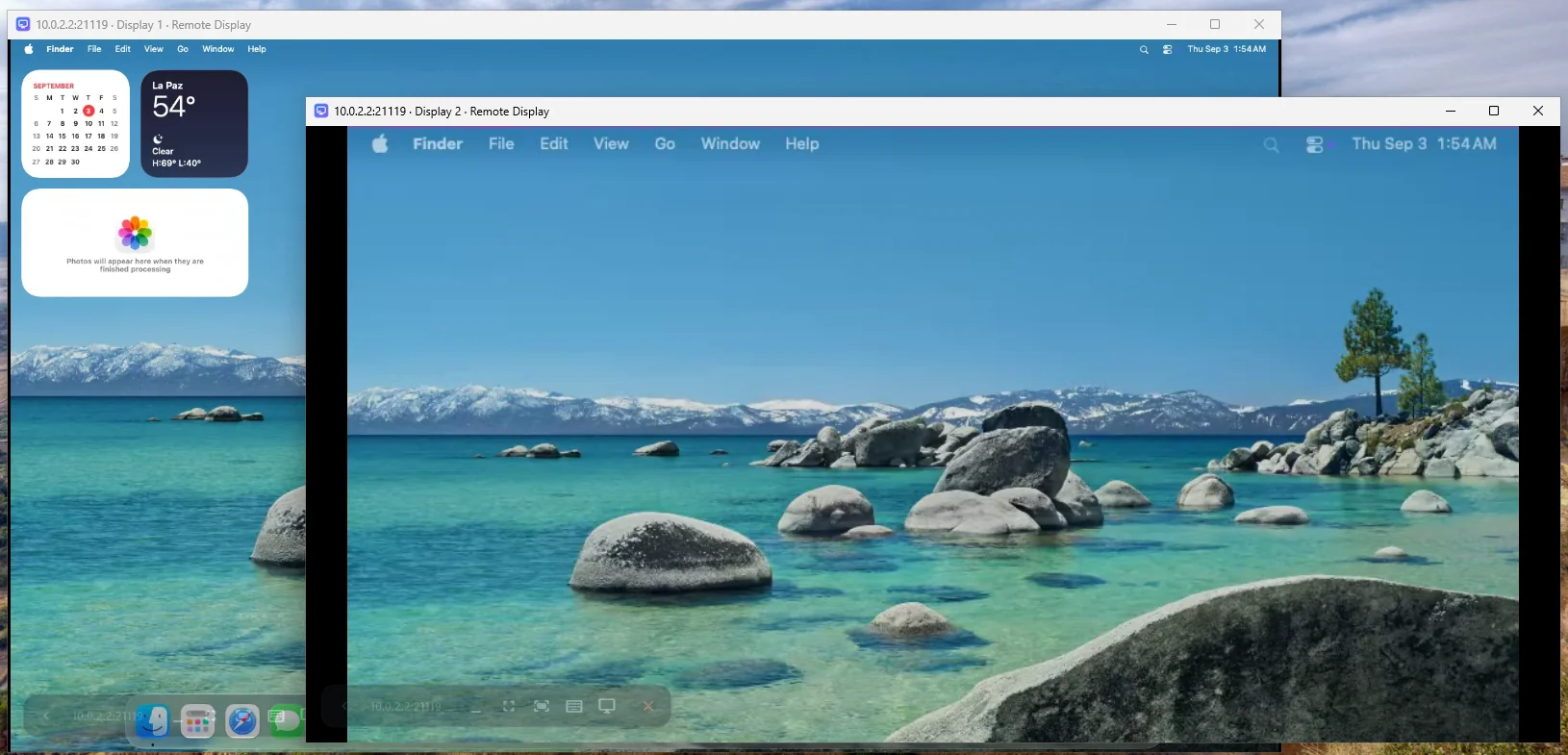
Remote desktop for your Mac from Windows, iPad or another Mac, built on the open-source RustDesk engine. Direct connection on your LAN or Tailscale, no accounts, no cloud. The Mac's displays, as they are, in one window or several.
Two displays of one Mac, each in its own window — or all of them at once.
4 clients
Windows · macOS · Android · iOS
2×
Retina capture, hardware H.265
0
Accounts, IDs or relays
RustDesk
Engine, protocol and codecs
Features
Everything a remote desktop should do, without the account
Direct, discovered, notarized and open source. The Mac's monitors stay the Mac's business.
Any display, any window
Pick which of the Mac's displays you see, open each one in its own window, or show them all at once on the desktop clients.
Perfect fit with SimpleDisplay
Want a display the size of your window? Add a virtual display on the Mac with SimpleDisplay, our free, open-source display manager, and hit Fit in the client. Remote Display shows it like any other display and never changes your Mac's configuration on its own. How they fit together →
Finds your Mac, at home and away
Computers on your LAN show up by themselves, and the Mac tells clients its Tailscale address, so it stays reachable from other networks. Pick the network per computer; passwords are remembered per address.
iPad with an external monitor
On an iPad, put one of the Mac's displays on the connected monitor and keep another one on the iPad, with trackpad-style touch input.
Notarized and open source
The server and the Mac client are signed with a Developer ID and notarized by Apple. Everything is AGPL-3.0 on GitHub, built on RustDesk 1.4.9.
Private by construction
Direct connection on your LAN or VPN with a password you set. No accounts, no IDs, no third-party servers. Everything is open source.
Perfect fit
Remote Display shows the Mac. SimpleDisplay shapes it.
SimpleDisplay is our other app: a free, open-source menu-bar tool that creates virtual displays on the Mac at any resolution, mirrors the physical monitor onto them or turns it off. Remote Display streams whatever displays the Mac has. Together they do what a remote desktop alone cannot: a Mac display that is exactly the size of the window you are looking at.
A display the size of your window
Create a virtual display in SimpleDisplay, Retina or not. In the Remote Display client, Fit picks the mode of that display closest to your window, so the Mac's desktop fills it: no black bars, no scrolling.
One display: the one you see
Mirror the Mac's physical monitor onto the virtual one, or turn it off for real, from SimpleDisplay's menu or its CLI over SSH. Remote Display follows every change and tells the clients right away.
Same author, same principles
Both apps are free software, signed with a Developer ID and notarized by Apple, and neither needs an account or a server. SimpleDisplay is under 2 MB and lives in the menu bar.
A fixed desktop squeezed into your window: black bars, scrolling, or tiny text.
Remote Display + SimpleDisplay
The Mac gets a virtual display your window's size, and Fit keeps it that way.
Why
Remote desktops want an account, an ID and a relay in the middle.
Remote Display started as a fork of RustDesk to control a Mac Studio from a Windows PC over Tailscale without signing up anywhere: a direct connection with a password, machines discovered on the LAN, and the same Mac reachable from outside. It shows the Mac's displays as they are; the monitors themselves are configured on the Mac — with SimpleDisplay if you want virtual ones.
Other tools
You→Account→Relay→Your Mac
An account, a device ID and a relay server between you and your own Mac.
Remote Display
You→Your Mac
Your Mac, its password, your network. Nothing else in between.
How it works
RustDesk underneath, a Mac-first server and clients on top
Remote Display is a fork of RustDesk 1.4.9. The engine, the protocol and the client plumbing are RustDesk's; the serverless discovery, the Tailscale-aware clients, the macOS menu-bar server and the stability work for mirrored displays are what this project adds.
From RustDesk
Screen capture, video encoding, input injection and the encrypted direct connection all come from the RustDesk engine, vendored with its changes documented in the repository. Remote Display would not exist without it.
Server (macOS 14+)
A menu-bar app bundling the engine as a per-user service. It shows the Mac's displays as macOS reports them — physical ones and any virtual display you add with SimpleDisplay — and ignores the reconfiguration noise a hardware mirror produces, so a mirrored display no longer restarts the video every second.
Client
A Flutter app on top of the same engine: the computers that answer from where you are, with their addresses (the rest wait behind a one-line note), one password per address, a display menu with open-in-new-window and all displays, and hardware H.265 decoding where the device has it.
Transport
RustDesk's protocol over a direct IP connection, no rendezvous or relay. LAN peers are discovered automatically, and the server announces its Tailscale address so clients reach it from other networks through your own VPN.
Measured, not assumed
macOS 26 has quirks around display reconfiguration (mirror sets, per-process display lists, capture streams that go silent). The repository keeps the harnesses and VM notes that measured them.
# what the client sees✓Connected mac-studio.local:21118 · direct, no relay✓Displays 2 · as macOS reports them
✓Codec H.265 · VideoToolbox on the Mac, hardware decode here
✓Fit Display 2 → the mode closest to this window
DISPLAYS● Display 1 physical 2560×1440
● Display 2 virtual 3440×1440 · SimpleDisplay ← here
Get started
Two installs, one password
A server on the Mac, a client wherever you are.
Step 1 · on the Mac
Install the server
Install Remote Display Server from the DMG, turn the service on, grant Screen Recording and Accessibility, and set a password. It lives in the menu bar. Want a virtual display? Add it with SimpleDisplay; it shows up as one more display.
First launch
The DMGs are signed with a Developer ID and notarized by Apple, so macOS opens them without warnings. The server then asks once for Screen Recording and Accessibility in System Settings → Privacy & Security.
Connect to the Mac's IP on port 21118 with that password, or tap it in Your computers. Then open the display menu in the toolbar: pick a display, open it in a new window, or show all of them.
Remote Display talks directly to your Mac. Here's what that means in practice.
Remote Display does not create virtual monitors or change the Mac's display configuration: use SimpleDisplay or macOS for that; the client shows whatever displays the Mac has.
"All displays" is available on the desktop clients (Windows, macOS); the iPad shows one display at a time, plus one on an external monitor.
No relay yet: connections are direct, on your LAN or through a VPN.
macOS builds are Apple silicon only for now. The server and the Mac client are notarized; the iOS build uses development signing.
AGPL-3.0
Built in the open
Remote Display is free software built on RustDesk: the engine inside is a modified copy of RustDesk 1.4.9 (AGPL-3.0), and the idea of a display that becomes the window comes from Tart. RustDesk is a trademark of its owners; this project is not affiliated with or endorsed by them. Contributions of all kinds are welcome.